Meteogram Pro Weather Widget
- 4.6
- Rating
- 100.00K
- Installs
- $10.99
- Price

 Analysis by App-foxy
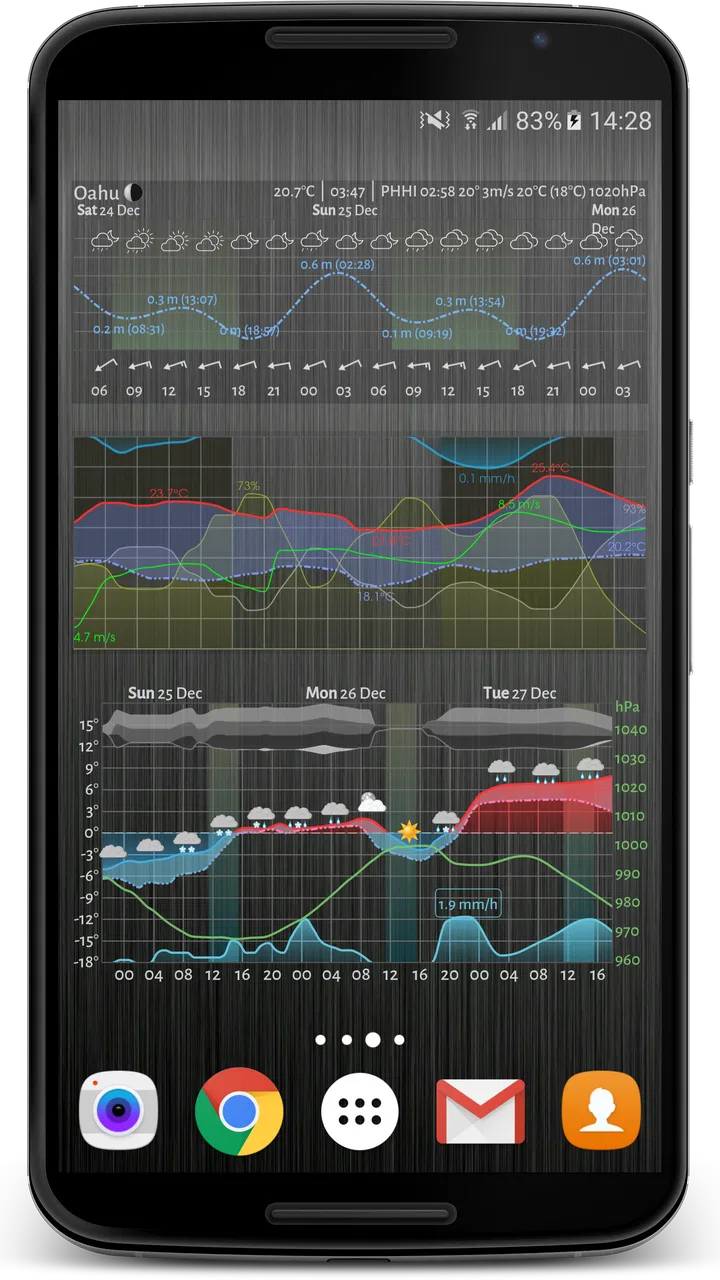
I like weather apps that help me make a decision rather than simply display a temperature. Meteogram Pro Weather Widget takes that practical approach by turning the forecast into a visual timeline, with weather conditions arranged so I can scan the day instead of opening several screens and interpreting separate icons. It is a weather app and widget from Meteograms Ltd, aimed at people who want more detail than a basic phone forecast provides.
After using it, my impression is that its strongest quality is clarity through context. A single temperature number tells me very little about whether I should walk, cycle, dry clothes outside, or plan a trip near the coast. A graphical forecast can show how temperature, rain, wind, cloud, and other conditions change together. The inclusion of tide charts also gives it a more specialized role than the usual general-purpose weather app.
The trade-off is that this is not the simplest weather experience. If I only want to know whether I need an umbrella, the amount of information can feel excessive. If I enjoy planning around changing conditions, however, that extra detail is exactly why it is worth considering.
You May Also Like

 Blood Strike: 2.5 Anniversary
Blood Strike’s Loadouts Turn Every Drop Into a Tactical Gamble
A close look at Blood Strike’s custom loadouts: how fast access to signature weapons reshapes its battle royale rhythm, rewards preparation, and narrows the gap between fights.

 Pandora - Music & Podcasts
Pandora’s Music Is Easy to Start, but Harder to Recover
Pandora’s strength is its low-effort path from a seed to a station. Its weak spot is how much confidence it asks you to place in connection, setup, and quiet recovery.

 8 Ball Pool
 Is Built on Rivalries, Rematches, and Routine
A close look at the rivalries, rematches, shared routines, and unanswered safety questions that turn a quick pool match into a persistent mobile community.

 Samsung Music
’s Quiet Strength Is Playing What You Already Own
Its reach comes less from spectacle than from dependable access to a personal library. That simplicity is both the app’s strongest retention engine and its ceiling.

 AccuWeather: Weather Radar
AccuWeather Review: A Quick, Clear Forecast for Everyday Decisions
For everyday plans, the best forecast is the one you can understand quickly. AccuWeather makes rain timing, radar, and local conditions easy to act on, with a few trade-offs.

 Hill Climb Racing
Why Hill Climb Racing Still Turns Crashes Into One More Run
A tiny car, a bumpy hill and one more upgrade: Hill Climb Racing keeps resurfacing because its simple chaos makes every near-miss feel personal.
More From Our News Desk



How the current version fits into everyday weather planning
When I decide whether this weather tool belongs on my home screen, I look beyond the forecast itself: the useful question is whether its timeline helps me make a choice sooner. I’d start by matching the widget’s visible detail to the decisions I actually make, rather than trying to display everything at once. That small bit of restraint makes it easier to judge how well the current version fits an everyday routine.
A forecast designed to be read as a timeline
The central idea is straightforward: instead of presenting the forecast as a stack of daily cards, the app uses a graphical layout to show weather developing across time. That difference matters because weather decisions are usually about timing. I do not merely need to know whether rain is expected today; I want to know whether it arrives before my commute, during an outdoor appointment, or later in the evening.
The visual format makes those transitions easier to notice. A line or band moving across the day can reveal a gradual temperature rise, a short period of rain, or a change in wind conditions without forcing me to compare multiple screens. This is especially useful when the forecast is mixed rather than simply “sunny” or “rainy.”
I would describe it as a tool for people who read forecasts rather than glance at them. The app rewards a little attention, because the value comes from seeing relationships between conditions. Someone who regularly checks the sky before leaving home may find that it turns a routine forecast check into a much more useful planning habit.
The widget is the practical centerpiece
A weather widget is most useful when it reduces friction, and this app’s widget-focused design is one of its clearest advantages. Instead of opening the application every time, I can use the home screen as a quick visual reference. That makes a difference on busy mornings, when I want to check the next few hours while preparing for work or school.
The widget is also more useful than a single temperature tile because a graphical forecast can show the shape of the day. I can look for a dry window, notice a sharp temperature change, or spot a period that may be uncomfortable for outdoor activity. The best way to use it is to place it where I naturally look, then open the full app only when I need to inspect the forecast more carefully.
There is a small but important trade-off here: a detailed widget needs more screen space than a minimalist weather icon. On a crowded home screen, it may compete with calendars, reminders, or music controls. I would choose the larger layout on a tablet or spacious phone screen, while a compact arrangement makes more sense if quick access matters more than detail.
Tide charts make it more relevant for coastal routines
The tide charts are not just an extra label attached to a general forecast. They change who can benefit most from the app. For someone who lives near the coast, goes fishing, visits beaches, photographs shorelines, or plans water-based activities, weather alone is only part of the picture. Wind and rain may look manageable, yet the tide can determine whether a location is accessible or worth visiting.
I find the combination useful because it keeps two related planning questions together: what will the atmosphere be like, and how will the shoreline change? That is more convenient than relying on a separate weather service and a separate tide reference. It also encourages better planning for activities where timing matters more than a broad daily forecast.
Still, I would not treat a tide chart as a substitute for local knowledge or careful safety planning. A chart can support a decision, but it should not be the only thing I consider for a coastal outing. The app is strongest as an organized planning aid, not as a promise that conditions will remain harmless.
What the version number tells existing users
The current version is 5.6.4, and the app has been available since November 8, 2014. That long presence suggests an established product rather than a newly launched experiment. For me, the important point is not the age alone, but the fact that the app has had time to develop around a specific concept: presenting weather visually and keeping tide information in the same experience.
Existing users should think of this as a mature, focused tool rather than a completely different kind of weather application. The core appeal remains the graphical forecast and the ability to consult information from a widget. I would not switch to it expecting a minimalist redesign or a social weather community. I would switch because I want a more structured way to interpret changing conditions.
That distinction is useful when considering an upgrade or a return after time away. The product’s identity is clear, so the question is whether its visual approach matches my habits. If I already prefer timeline-style forecasts, the current version fits naturally. If I normally avoid detailed charts, a newer version number alone will not change that basic preference.
Changes that matter in practice
The most meaningful development is the continued refinement of a weather experience built around graphical presentation rather than a simple list of forecast values. In practical terms, that means the app is best judged by how quickly I can understand a day’s pattern, not by whether it resembles the default weather screen on my phone.
For an existing user, this approach can make the app feel dependable because the workflow stays recognizable. I can use the widget for a quick check, move into the full forecast when I need more context, and consult tide information when the location and activity call for it. That continuity is valuable: a weather tool should become part of a routine instead of making me relearn the interface every time I check the sky.
At the same time, I would keep expectations realistic. A graphical display does not eliminate uncertainty in weather forecasting. It only presents the forecast in a way that can make timing and comparison easier. The app improves interpretation; it does not turn a forecast into a guarantee.
A realistic morning workflow
Imagine that I have a morning commute, a lunch appointment outdoors, and a short walk planned after work. A basic weather app might tell me the general conditions for the day, but I still have to work out when rain is most likely and whether the temperature will change enough to affect my clothing.
With the widget visible, I can first scan the day before leaving. If the graph shows a dry period around the commute but a wetter stretch later, I can adjust the walk or carry suitable clothing. When I need more detail, I can open the full forecast and examine the transition rather than relying on a single daily icon. If I am spending the evening near the coast, the tide chart adds another timing reference.
This is one of the app’s less obvious strengths: it supports decisions across a day, not just a yes-or-no answer about the weather. The benefit is greatest when plans are flexible enough to move by an hour or two. If my schedule is fixed, the forecast still helps me prepare, but it cannot remove the inconvenience of poor conditions.
Who will get the most from it
I would recommend it to people who regularly plan around weather changes. Commuters who walk or cycle, gardeners, photographers, travelers, runners, and anyone arranging outdoor work can benefit from seeing conditions as a sequence. It is also a sensible choice for coastal users who want tide charts beside their weather information.
The app is particularly appealing if I often ask questions such as “When will the rain stop?” or “Will the wind increase before I go out?” Those questions are more specific than a daily temperature forecast, and a graphical display is better suited to answering them at a glance.
It may also suit experienced weather watchers who dislike overly simplified interfaces. The ability to see several changing factors together can reveal patterns that disappear inside a row of generic icons. In that sense, the app sits between a casual forecast and a more technical planning instrument, without requiring me to use a full specialist weather station.
Who should choose a simpler alternative
I would skip it if my only requirement is a quick current-temperature check. A standard phone weather app is usually faster for that narrow task, especially when I do not care about hourly changes, visual trends, or tides. A simple forecast may also be better for children or family members who find dense charts harder to read, even though this app has an Everyone content rating.
People who want radar maps, severe-weather notifications, or a broad collection of unrelated weather tools should also compare alternatives carefully. The defining experience here is the meteogram-style forecast and widget, not an attempt to be every possible weather service in one place. Choosing it makes sense when that specific presentation solves a real problem.
There is also a cost question. The listed price is $10.99, while in-app purchases range from $0.99 to $41.99 per item. That makes it important to understand what I actually need before committing. For occasional weather checks, paying for a specialized visual tool may feel unnecessary. For someone who uses the widget daily or relies on tide information, the convenience can justify the expense more easily.
Where it sits beside ordinary weather apps
Compared with the default weather app on a phone, this one feels more deliberate and information-rich. The usual alternative is often better for speed, broad familiarity, and a clean summary. Meteogram Pro Weather Widget is better when I want to compare conditions across hours and see how they interact.
Compared with a dedicated marine or tide application, its advantage is convenience rather than depth. Having weather and tide information in one place reduces app switching, but a specialist marine tool may be preferable for users whose decisions depend heavily on coastal conditions. I would use this app as a practical combined reference, while still treating specialized sources as more appropriate for demanding or safety-sensitive activities.
Compared with a notification-driven weather service, the app encourages me to check conditions proactively. That can be a strength because I am not waiting for an alert to tell me something has changed. It can also be a weakness if I need automatic warnings and tend to forget to look at the forecast myself.
Small frictions that affect daily use
The same detail that makes the charts useful can make them feel busy. On a small screen, several weather layers may require concentration, particularly when I am standing outside and trying to check quickly. I would spend a little time adjusting the widget’s size and deciding which information I genuinely use rather than keeping every possible detail visible.
Another limitation is that visual information still needs interpretation. A chart can show a change, but I must understand whether that change matters for my activity. Someone new to this style of forecast may initially find a row of familiar daily icons easier. The app is not difficult because it is poorly designed; it is simply asking me to read weather in a more analytical way.
The purchase structure may also create hesitation. The main price and additional in-app purchase range mean I would review the available options carefully before assuming everything I want is included in one payment. That is not automatically a flaw, but it does make the buying decision less casual than downloading a free basic weather app.
Useful habits for getting better results
My first tip is to use the widget for pattern recognition, not detailed investigation. I look for the broad shape of the next several hours, then open the app only when a specific decision depends on a narrow time window. This keeps the daily routine quick while preserving the deeper information when it matters.
My second tip is to compare the forecast with the activity rather than with a fixed comfort rule. A mild temperature may still be unpleasant for cycling if wind rises, while a cooler period may be perfectly manageable for a short walk. The graphical format is valuable because it lets me weigh several conditions together instead of reacting to temperature alone.
For coastal plans, I would check tide timing before choosing the activity window, then use the weather graph to decide what to wear and whether the trip is comfortable. This order prevents me from treating a pleasant weather forecast as sufficient when the shoreline conditions may be the factor that actually determines the plan.
I would also avoid reading a single point on the graph as absolute truth. Forecasts are estimates, and the farther ahead I look, the more useful the overall trend becomes than an exact expectation for one moment. The app helps me plan intelligently, but good judgment still means leaving room for changes.
What existing users should watch
Users who already depend on the app should pay attention to how well the current version continues to fit their screen, routine, and preferred level of detail. The most important signs are practical: whether the widget remains easy to read, whether the graphical layout helps with real decisions, and whether tide information continues to save time compared with separate tools.
I would also watch the balance between customization and clarity. More choices can be useful for experienced users, but too many visible elements can make a forecast slower to interpret. The best setup is not necessarily the most detailed one; it is the one that surfaces the conditions I actually use.
For new users, I would watch my own behavior during the first week. If I repeatedly use the widget to adjust journeys, outdoor work, or coastal plans, the specialized format is earning its place. If I keep opening a simpler app instead, the extra detail is probably not solving a meaningful problem.
My final recommendation
Meteogram Pro Weather Widget is a focused weather app for people who want to understand how conditions evolve, not merely receive a daily label. Its graphical forecast gives hourly planning more context, the widget makes that information available without much effort, and tide charts broaden its usefulness for coastal routines. The product comes from Meteograms Ltd and has built a substantial audience, with an average rating of 4.6 from around 1.4 thousand ratings and over 100 thousand installs.
I would recommend it to a weather-conscious user who values visual trends and is willing to spend time learning a denser forecast. I would not recommend paying for it solely to check today’s temperature or confirm whether rain is possible. In those cases, the default phone app may be quicker and more economical.
The app’s real value is not that it predicts the future perfectly. It is that it helps me organize the forecast into a timeline I can act on. For daily outdoor planning, flexible schedules, and coastal activities, that can be a meaningful improvement over ordinary weather cards. For everyone else, the price and information density are good reasons to pause before choosing it.
FAQs for Meteogram Pro Weather Widget
01What is Meteogram Pro Weather Widget?
Meteogram Pro Weather Widget is an Android weather application that displays detailed forecast information directly on your home screen. Instead of showing only a temperature and weather icon, it can present data such as hourly conditions, precipitation, wind, pressure, humidity, sunrise and sunset times, and temperature changes in a visual meteogram-style layout. It is designed for users who want more information at a glance.
02What information can I customize in the Meteogram Pro widget?
The widget offers extensive customization, allowing you to adjust its appearance and the type of forecast data displayed. Depending on the selected configuration, you can change the layout, colors, text size, transparency, background, time range, units, and weather details. You may also choose which elements are most important to you, such as rain probability, wind speed, temperature, or cloud coverage.
03Does Meteogram Pro Weather Widget provide accurate weather forecasts?
Meteogram Pro presents forecast data supplied by its available weather services, but accuracy can vary according to location, provider, update frequency, and changing atmospheric conditions. In my experience, the visual presentation makes trends easy to understand, particularly for short-term planning, but it should not be treated as a guarantee. For severe weather, users should also consult official local alerts.
04Does Meteogram Pro Weather Widget affect battery life?
As with any widget that periodically updates location and weather information, Meteogram Pro may use some battery power, especially when automatic location detection and frequent refreshes are enabled. The impact is generally manageable, but users with strict battery-saving settings may prefer a longer update interval or a manually selected location. Android battery restrictions can also affect how promptly the widget refreshes.
05Is Meteogram Pro Weather Widget free to use?
Meteogram Pro is a paid or premium-focused weather widget, so users should check the current Google Play listing for its exact price, purchase model, and any included features before downloading. Availability of features, weather providers, advertising, and optional purchases may change over time. Because it is primarily a widget rather than a conventional full-screen weather app, its value depends on how much forecast detail you want visible on your home screen.
Pros
- Highly customizable widgets with multiple layouts and display styles.
- Detailed hourly and daily forecasts are easy to check at a glance.
- Supports weather data from several providers for flexible forecast options.
- Includes useful details such as precipitation
- wind
- pressure
- and moon phases.
- Ad-free experience keeps the widget clean and unobtrusive.
Cons
- The large number of settings can feel overwhelming for first-time users.
- Some weather providers or advanced options may require additional payment.
- Widget appearance may vary depending on the Android launcher and screen size.
- Accurate forecasts depend on the availability and quality of the selected provider.
- It is primarily designed for Android and may not suit users seeking an iOS widget.

Meteogram Pro Weather Widget
Gallery